
Scripps News
NewsyNews & Magazines
3.71.15K Reviews
- Version
- Varies With Device
- Installs
- 100.00K
- Age Rating
- Everyone
Screenshots
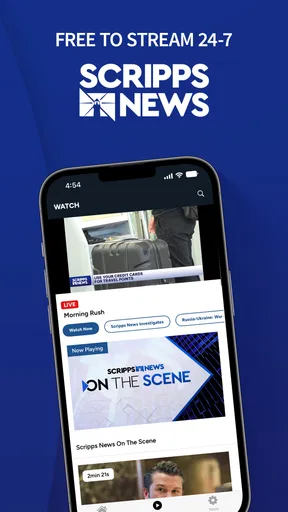


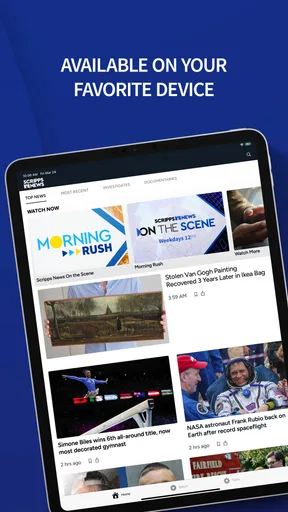
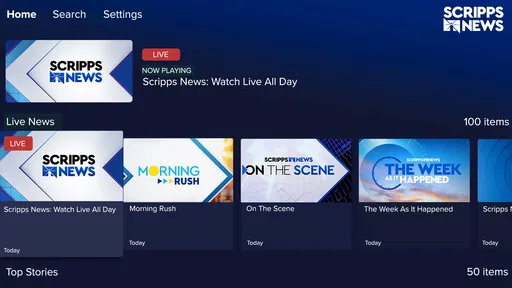
Our Review of Scripps News
 Analysis by Appyee
I used Scripps News as a general news app rather than as a replacement for every source I read. That distinction matters. It is free, aimed at everyone, and built around a straightforward mix of current headlines, breaking coverage, investigations, and reporting from the field. In my experience, its best role is helping me understand what deserves attention before I decide where to spend more time.
The app comes from Newsy, a developer that has been associated with the product since its release on February 26, 2010. It sits in the News & Magazines category, has passed 100 thousand installs, and carries an average rating of 3.7 from around 2.7 thousand ratings. Those figures suggest a useful but not universally loved news experience: enough people rely on it to keep returning, while the middling score is a good reminder that news apps are judged heavily on presentation, update timing, and personal expectations.
My overall impression is that Scripps News works best when I want a clean starting point for the day. I can open it, scan the major developments, and decide whether I need a deeper article, another outlet, or simply a quick understanding of what is happening. It is most valuable as a repeatable news-checking habit, not as a complete information diet.
How I use Scripps News in a normal day
I use Scripps News as a brief check-in, not something I leave running in the background. In this section, I’ll focus on how a few small choices—when I open it, what I read first, and when I stop—make a broad news feed easier to fit into an ordinary day. That routine also helps me notice when I need to look beyond a headline.
A practical baseline workflow for busy mornings
My usual routine begins with a short scan rather than opening every item. I look first for stories that affect my immediate plans: major public events, severe developments, transport-related news, or a story that may change during the day. Then I separate those from slower investigations and background pieces. This prevents the common mistake of treating every headline as equally urgent.
That workflow suits the app’s broad news focus. Scripps News is not limited to one subject such as finance, technology, sports, or entertainment. The advantage is range: I can use one opening session to get a sense of the wider news cycle. The trade-off is that a general feed may include plenty of material that is interesting but irrelevant to me. I have to make the final decision about what deserves attention.
For a realistic example, I might check the app while having breakfast before work. I scan the main stories, open one report that affects my region or schedule, and leave longer investigations for the evening. If a developing story is important enough, I compare it with another trusted source before making a decision based on it. That last step is not a criticism of this app alone; it is a sensible habit with any single news source.
I also find it useful during short breaks. Instead of scrolling endlessly through social media, I can spend a few minutes checking the news and then stop. The app’s value here comes from giving the session a clear purpose. I am not trying to consume everything. I am using it to answer a simple question: what changed since I last looked?
What the reporting mix adds
The combination of headlines, immediate updates, investigations, and on-the-ground reporting gives the app a broader feel than a basic headline aggregator. A headline-only service may be quicker, but it often leaves me with little sense of why a story matters. Longer reporting can provide context, while field reporting can make a developing event feel less abstract.
I would not expect every item to have the same depth. Breaking coverage naturally changes faster than an investigation, and a short update may be more useful when facts are still developing. My advice is to judge each item by its purpose. Use a brief report to orient yourself, then look for a fuller piece when the subject affects your work, travel, money, health, or family.
One less obvious benefit is that the mix can help me notice the difference between immediate importance and lasting importance. A breaking headline may dominate the moment, while an investigation may explain a problem that will still matter after the initial news cycle fades. I get more from the app when I deliberately read both kinds instead of chasing only the newest item.
Settings and habits worth checking first
When I install a news app, I do not immediately allow every alert or treat every notification as essential. I first decide how often I realistically want to be interrupted. For Scripps News, that means reviewing the notification choices available on my device and keeping only the alerts that fit my routine. If I am working, studying, or trying to sleep, too many prompts can turn useful news into background noise.
This is also where personal priorities matter. Someone who follows fast-moving public events may prefer timely alerts, while another reader may want to open the app only at chosen times. I would start with a restrained setup and adjust it after several days. If I keep ignoring alerts, they are not helping me; if I repeatedly discover important updates too late, I may need a more active setting.
I also check the phone’s general battery, data, and notification controls rather than assuming the app should manage everything. News consumption can become surprisingly wasteful when I leave a feed open or repeatedly refresh it without a reason. A simple habit works better: check at planned moments, read what matters, and close the app when I am done.
Another useful setting-related decision is whether the app should be part of my morning routine, evening routine, or both. I prefer a short morning scan and a more deliberate evening read. That separation reduces the temptation to react to every update throughout the day. It also gives investigations and longer reports a better chance of receiving my full attention.
Faster patterns for repeat users
The fastest way to use Scripps News is not to read faster; it is to make better opening decisions. I scan the first screen for three things: what is new, what is relevant to me, and what appears likely to develop. I then open only the strongest candidates. This simple filter keeps a broad news app from becoming an endless list.
I also avoid opening several similar stories at once. If multiple items cover the same event, I begin with the clearest one and return to the others only if they add a different angle. That saves time and helps me notice whether I am learning something new or merely rereading the same update.
A useful repeatable pattern is the two-pass check. On the first pass, I gather the outline of the day in a few minutes. On the second, I revisit one or two subjects that genuinely matter. The first pass protects me from missing major developments; the second prevents shallow headline reading. This approach is especially helpful for people who have limited time but still want more than a stream of titles.
I use a similar method for investigations. I do not open a long report when I am about to leave home or join a meeting. Instead, I note it mentally and return when I can read without rushing. That sounds obvious, but it changes the quality of the experience. Longer reporting is easier to understand when I am not treating it like a quick alert.
Where it compares well with familiar alternatives
Compared with a social media feed, Scripps News gives me a more intentional starting point. Social platforms are useful for discovering what people are discussing, but their streams can mix reporting, opinion, jokes, advertising, and repetition in ways that make priority difficult to judge. A dedicated news app removes much of that distraction and makes it easier to begin with reported stories.
Compared with a highly specialized news service, Scripps News is broader and less tailored. A finance-focused app will usually be better for market movements, company filings, and investment research. A local publication may be better for neighborhood decisions, school notices, or community reporting. A wire-style service may be preferable when I want very compact updates with minimal extra presentation.
Its strongest comparison point is balance. I can get a general overview without subscribing to a narrow subject feed, while the presence of investigations and field reporting gives me more substance than a bare headline reader. The weakness is equally clear: readers who want deep personalization or one specific beat may find the broad approach less efficient.
Advanced limits I noticed in the experience
The app should not be treated as a guarantee that I have the full story. News changes quickly, and a developing report can become more detailed or be corrected as new information arrives. I make a point of checking the wording and context before repeating a dramatic claim, especially when the subject could affect someone’s safety, finances, or reputation.
I also would not use it as my only local information source. Broad reporting can tell me that an important event is happening, but local services, official notices, and community outlets may be more useful for precise instructions near me. Scripps News can start the investigation, but it may not finish the practical task.
Another limitation is attention management. A free news app is easy to open repeatedly, and the constant possibility of a new headline can encourage anxious checking. I get a better experience when I set boundaries around it. News should inform my day, not occupy every quiet moment in it.
The average rating of 3.7 reflects why expectations should remain realistic. I would not choose this app expecting a perfectly personalized feed or a flawless substitute for every publication. Presentation preferences differ, and some readers will want more control over subjects, local coverage, or reading depth. Others will appreciate having a broad, accessible place to begin.
Who should use it, and who should skip it
I recommend Scripps News to readers who want a free general-news app for regular check-ins. It is a good fit if I want headlines, developing coverage, investigations, and reporting from the field in one place, while still being willing to verify important details elsewhere. It also suits someone who prefers a dedicated news environment over the unpredictability of social feeds.
I would suggest it for students who need a quick awareness of current events, commuters who want a short reading routine, and busy workers who can spare a few minutes at set points in the day. Because the content rating is Everyone, it is also presented as an app for a broad audience rather than a narrowly adult service.
I would skip it if my main goal is specialist analysis. Investors, local residents seeking highly detailed community updates, and readers who want a tightly controlled subject feed may be happier with a more focused alternative. I would also skip relying on it alone if I need official instructions or professional advice rather than general reporting.
My mastery routine after regular use
After using the app repeatedly, I settled on a simple system. I keep notifications limited, perform a quick morning scan, save my attention for stories with real relevance, and return later for investigations instead of forcing them into a rushed session. I also compare important developing claims with another reliable source before acting on them.
The key insight is that the app becomes more useful when I stop asking it to do everything. It is excellent at opening the door to the news cycle. It is less suitable as a complete archive, a specialist research tool, or a substitute for official local information. Knowing that boundary makes the experience feel more reliable, because I am using the right tool for the right question.
Newsy has kept Scripps News available as a recognizable news and magazines option for many years, and its free price makes trying that routine easy. The app has enough variety to support both a quick scan and a deeper reading session, but its broad scope requires some discipline from me. I have to choose what matters rather than expecting the feed to make every decision.
My final verdict is positive with sensible limits. Scripps News is a practical first stop for readers who want broad coverage without paying to begin. I would recommend it to a friend who wants a calmer alternative to social media headlines and who understands the value of checking a second source for high-stakes or rapidly changing stories. If that sounds like your use case, it is worth adding to your routine; if you need narrow expertise or detailed local service information, another app will probably serve you better.
Verdict
Strengths of Scripps News
- Clean, modern interface makes headlines easy to scan.
- Offers live news coverage alongside on-demand stories.
- Includes video reports for users who prefer visual updates.
- Focused reporting avoids the clutter of many general news apps.
- Free access makes its content easy to try without a subscription.
Limitations of Scripps News
- Some stories may feel less detailed than coverage from larger outlets.
- Breaking-news notifications can become distracting if left enabled.
- Content availability and coverage may vary by location.
- Video playback can use significant mobile data on cellular networks.
- The app may feel limited for users seeking extensive opinion content.
Similar Picks in This Category
View All
Google News - Daily Headlines
Google LLC4.0

X
X Corp.4.8

Flipboard:Your Social Magazine
Flipboard3.4

Opera News: breaking & local
Opera4.5

Hindi News by Dainik Bhaskar
Dainik Bhaskar Group4.0

Way2News Daily News App
Way2News ( Formerly Way2SMS )4.6
Frequently Asked Questions
What is Scripps News?
Scripps News is a digital news app that provides national and international coverage through articles, live reporting, video clips, and continuously updated headlines. Its content focuses on major current events, politics, business, technology, science, and human-interest stories. The app is designed for users who want a straightforward way to follow developing news without relying only on traditional television broadcasts.
Is Scripps News free to download and use?
Yes, the Scripps News app is generally free to download and use on supported Android and iOS devices. Users can browse news stories, watch available video content, and follow live coverage without necessarily paying for a subscription. However, internet usage may consume mobile data, and some content or features could change over time depending on the app’s regional availability and updates.
Does Scripps News offer live news coverage?
Scripps News may provide live news programming, breaking-news coverage, and video updates directly through the app, depending on your location and the current service lineup. Live availability can vary because of licensing, regional restrictions, scheduled programming, or technical changes. If a live stream is unavailable, users can usually still access written reports, recorded segments, and updated headlines.
Can I receive breaking-news notifications from Scripps News?
The app may support notifications for breaking stories, major developments, and other selected updates. After installation, you can normally manage notification permissions through the app or your device settings. Notifications are useful for staying informed quickly, but frequent alerts may be distracting. Users who prefer a quieter experience should review the available notification categories and disable alerts they do not need.
Does Scripps News require an account or work on every device?
Scripps News can generally be installed on compatible Android and iOS phones or tablets, although exact system requirements may vary by version. Many news features may be available without creating an account, but certain preferences, personalization tools, or regional functions could require additional access. Before downloading, check the official store listing for supported operating-system versions and availability in your country.
